
Wind is one of the few time-lapse challenges that can affect even experienced photographers using high-quality equipment. The best solution is always prevention: use a sturdy tripod, add weight to it whenever possible, avoid extending the tripod legs fully, and seek natural wind protection when shooting in exposed locations.
Unfortunately, even with the best preparation, strong gusts can still introduce subtle camera movement. When that happens, stabilization software becomes an essential part of the workflow and can often transform a shaky sequence into a perfectly smooth time-lapse.
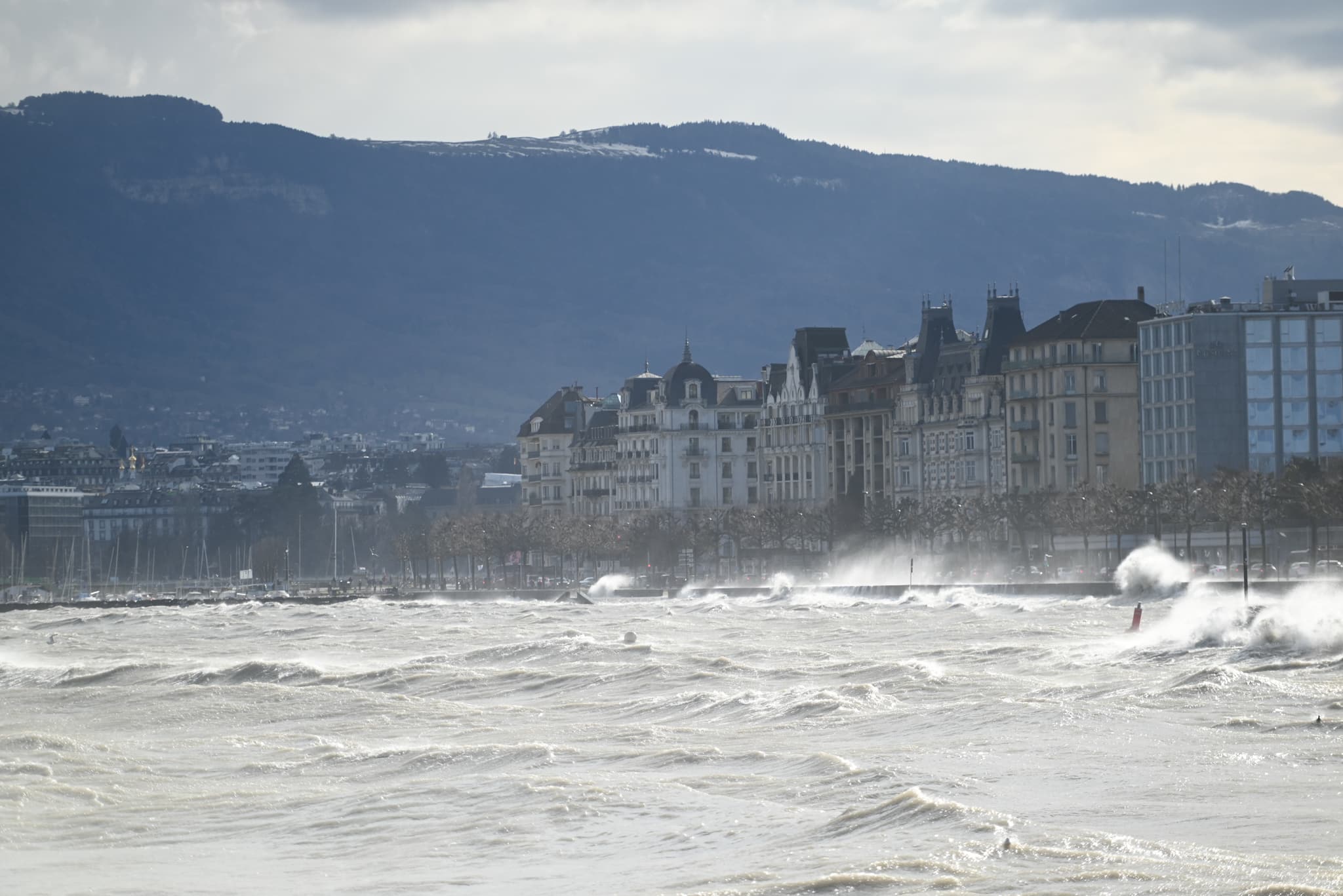
Before / After: a windstorm on Lake Geneva
This sequence was shot in Geneva during a strong windstorm. On the left, the raw frames simply assembled into a video. On the right, the same sequence automatically aligned by Futura Time Lapse 4.0 using the Straight stabilization mode. The waves, spray and light keep moving exactly as they did on location: only the unwanted camera movement is gone.
Why Wind Is Such a Challenge for Time-Lapse Photography
Unlike video, a time-lapse is built from hundreds or thousands of individual photographs captured over an extended period. Every gust of wind can move the camera slightly between exposures.
The movement is often so small that it goes completely unnoticed in the field. Many photographers only discover the problem when they render the final sequence and see the image vibrating or jumping from frame to frame.
The visibility of this effect depends heavily on focal length:
- With wide-angle lenses, small vibrations are usually insignificant and may not be visible at all in the final video. Wind-induced shake is rarely a serious issue below approximately 75 mm full-frame equivalent.
- At 200 mm full-frame equivalent and beyond, even tiny physical movements of the camera can produce large shifts within the image. What felt like a perfectly stable setup during capture can suddenly turn into a visibly shaky time-lapse.
This is why wind stabilization is especially important when shooting landscapes, wildlife, distant mountain ranges, city skylines, or astronomical subjects with telephoto lenses.
The Solution: Stabilize the Sequence in Post-Processing
When a time-lapse suffers from wind-induced movement, stabilization software can analyze the position of the scene across all frames and automatically compensate for unwanted camera motion.
In most situations, a simple correction along the horizontal and vertical axes is all that’s required. Wind tends to create small random shifts rather than complex camera movements, making standard stabilization highly effective.
In Futura Time Lapse, the Straight stabilization mode is specifically designed for this type of correction and is typically the best starting point for wind-induced shake.
The process consists of:
- Detecting stable features throughout the sequence.
- Measuring frame-to-frame displacement.
- Re-aligning every image.
- Exporting a stabilized sequence.
The result is a time-lapse where the intended motion remains visible, such as changing light, moving clouds, flowing water, or traffic, while unwanted camera movement disappears.
Choosing the Right Reference Area
For stabilization to work optimally, the software should analyze parts of the image that remain stationary throughout the sequence.
Buildings, mountain ridges, rock formations, lighthouses, towers, and other fixed structures make excellent reference points. These elements provide reliable landmarks that can be tracked from frame to frame.
Conversely, moving elements can reduce stabilization accuracy because they do not stay in the same position throughout the sequence. When possible, exclude regions containing:
- Moving clouds
- Traffic
- Waves
- Swaying vegetation
- Crowds
- Any other constantly moving subjects
For example, if the upper half of the image contains fast-moving clouds while the lower half contains a mountain range, the mountain range is usually the better area for stabilization analysis. In the Geneva sequence above, the buildings on the shore are the reference, not the lake or the sky.
By focusing exclusively on static portions of the scene, the stabilization process can produce significantly more accurate results.
Processing Time
The exact processing time depends on image resolution, computer performance, and scene complexity. As a practical rule of thumb, around one second per image is a reasonable estimate on a modern computer. For example:
- 300 images: roughly 5 minutes
- 600 images: roughly 10 minutes
- 1,200 images: roughly 20 minutes
Actual processing times may vary, but stabilization is typically fast enough to be a routine part of the time-lapse workflow.
Recovering Wind-Damaged Time-Lapses with Futura Time Lapse
Futura Time Lapse includes an automatic stabilization feature specifically designed to correct unwanted camera movement in image sequences.
Using the Straight stabilization mode, the software analyzes the sequence, detects frame-to-frame displacement, and automatically aligns the images. By selecting appropriate static reference areas and excluding moving elements such as clouds or traffic, photographers can achieve highly accurate stabilization even in challenging conditions.
This is particularly valuable when working with long telephoto lenses, where tiny vibrations can become highly visible in the final render.
Final Thoughts
Wind is an unavoidable part of outdoor time-lapse photography, especially on coastlines, mountaintops, rooftops, and other exposed locations. The longer the focal length, the more visible the problem becomes.
Good field technique can minimize the risk, but stabilization software is often what ultimately saves a sequence.
With automatic stabilization in Futura Time Lapse, wind-induced camera shake can be eliminated completely in the vast majority of real-world cases. Even sequences captured with long telephoto lenses in difficult conditions can be transformed into smooth, professional-quality time-lapses with only a few clicks.
Discover Futura Time Lapse and try the free Community Edition on your own sequences.
